Sie haben eine Website oder einen Webshop. Sie haben einige Besucher, aber der wirkliche Erfolg fehlt.
Wie kommen Sie zu mehr Besuchern? Und vor allem, wie bringen Sie die Besucher dazu, auf den richtigen Button zu klicken? Und Ihnen so Umsatz bringen?
Das ist nicht so einfach!
Zum Glück haben Sie mich gefunden.
Ich erkläre Ihnen, was wo auf Ihre Website gehört. Schauen Sie, was dann passiert.

Beratung mit Emile Schenk:
In einer Stunde vier dicht beschriebene Seiten voller sofort umsetzbarer Tipps für meine Website. Danke!
In den 90-er Jahren arbeitete ich in einem Konzern und begann dort Onlineshops zu entwickeln.
Im Lauf der Jahre sammelte ich Erfahrung in allen Bereichen, die mit E-Commerce zu tun haben. Ich entwickelte Websites und Webshops und beschäftigte mich mit den Erfolgskriterien.
SEO und Adwords damit Besucher die Website finden. Gut funktionierende Technik ist selbstverständlich. Social Media für die Kommunikation mit den Besuchern kam später dazu.
Usability und Verkaufspsychologie werden als Erfolgsfaktoren leider oft unterschätzt. Wie führe ich den Besucher durch meine Website, damit er dort landet, wo er landen soll?
Seit mehr als 10 Jahren beschäftige ich mich mit Usability und Verkaufspsychologie im Internet. Gerne zeige ich Ihnen, wie Sie auf Ihrer Website die Besucher zum Ziel führen.
Ein paar beeindruckende Resultate von meinen Tests mit Usability und Verkaufspsycholöogie im Internet:

„Betreuung unseres Webshops durch Emile Schenk hat den Umsatz enorm gesteigert.“
Für große und kleine Websites
Die letzten Jahren hatte ich die Verantwortung für den E-Commerce Bereich von Unternehmen mit einem Gesamtumsatz von 37 Millionen Euro. Diese Unternehmen sind fortlaufend gewachsen durch u.a. Verkaufspsychologie im Internet.
Ich stelle mein Know-how sowohl großen wie auch kleinen Firmen zur Verfügung. Eine Verbesserung von Website oder Webshop ist praktisch immer möglich. Sie können mehr Erfolg im Internet erzielen mit Verkaufspsychologie.
Anfangen mit einfachen Schritten
Manche Maßnahmen zur Verbesserung Ihrer Website sind einfach zu realisieren und bringen viel.
Ich zeige Ihnen diese sogenannten low hanging fruits. Damit sehen Sie rasch Ihre ersten Erfolge.

„52% Umsatzwachstum mit der ersten Maßnahme. Super Erfolg mit Emile Schenk!“
Conversion Optimierung nennt man die Verbesserung einer Website, mit dem Ziel die Anzahl der Klicks auf die wichtigen Buttons und so den Umsatz zu steigern. Die Basis für Conversion Optimierung ist Verkaufspsychologie.
Erfolg garantiert
Mit kleinen Maßnahmen wie Textänderungen oder größeren Maßnahmen nach dem Überlegen was Ihre Zielgruppe wirklich benötigt, erzielen Sie konkrete Erfolge.
Mehr Klicks und mehr Bestellungen!
Meine Erfahrung bringt Sie weiter
Mit mehr als 20 Jahren Erfahrung mit Wachstum im E-Commerce unterstütze ich Sie, damit Ihre Website oder Ihr Webshop erfolgreich wird.
Für kleine und große Unternehmen
Unabhängig von der Unternehmensgröße zeige ich Ihnen, welche Maßnahmen zu mehr Erfolg im Internet führen.
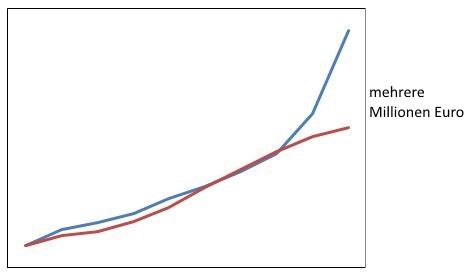
Umsatzkurven meiner Kunden.
Mehr Kunden und mehr Umsatz ist möglich.
Ich zeige Ihnen wie.
Verkaufspsychologie wirkt im Internet genau so wie im stationären Handel. Das Hirn des Menschen ist in einigen Punkten steuerbar durch bestimmte Impulse. Verwenden Sie die richtigen Impulse auf Ihrer Website, damit Sie mehr Erfolg im Internet erzielen.
Eine leicht zu bedienende Website führt die Besucher über die notwendigen Schritte zum Ziel Ihrer Website. Weniger Besucher brechen zwischendurch ab, mehr Besucher klicken auf den wichtigen Button, Sie haben mehr Erfolg.
„Emile Schenk ist ein Top-Partner: Wachstum, Super-Technik, hohe Verlässlichkeit und schnelle Reaktionszeiten“
Was können Sie schon jetzt selber tun?
Rufen Sie irgendeine Seite Ihrer Website auf.
Stellen Sie sich 1,5 Meter weit weg von Ihrem Bildschirm oder 0,5 Meter von Ihrem Handy. Können Sie etwas lesen? Macht das, was Sie lesen können, Sie neugierig, möchten Sie mehr wissen?
Wenn ja, dann haben Sie schon etwas richtig gemacht.
Wenn nein, dann überlegen Sie sich, was Sie verbessern können. Oder Sie rufen mich an und ich zeige Ihnen, wo das Potential Ihrer Website liegt.

„Mit ein paar Maßnahmen von Emile Schenk hat sich die Anzahl der Bestellungen spürbar verbessert“
Rufen Sie mich an.
Sie erzählen mir, was Sie mit Ihrer Website erreichen möchten und wer Ihre Kunden sind.
Wir sehen uns gemeinsam Ihre Website an. Ich sage Ihnen sofort, ob ich "low hanging fruits" finde, Punkte die mit wenig Aufwand zu mehr Erfolg führen.
Zu einem günstigen Einsteigspreis erhalten Sie Verbesserungsvorschläge zu den "low hanging fruits" Ihrer Website.
So lernen wir einander kennen und Sie sehen erste Optimierungserfolge.
Wir besprechen danach gemeinsam weitere Projektschritte.
Mit Google Analytics oder anderen Meßmethoden können Sie genau sehen, was die Auswirkungen von Optimierungsmaßnahmen sind.
Beratung mit Emile Schenk:
In 1 Stunde 4 dicht beschriebene Seiten voller sofort umsetzbarer Tipps für meine Website. Danke!
um die Verbesserung Ihrer Website anzugehen.
Rufen Sie mich an jetzt anrufen: 0676 580 1525
oder senden Sie mir ein E-Mail an .
 Ich zeige Ihnen, wie Sie mehr Umsatz
Einige der Firmen, die unterstützt habe:


„Seit die verbesserte Website online ist, habe ich wesentlich mehr Anmeldungen. Das freut :-)“
Ich betreue Firmen, die im E-Commerce-Bereich gerade starten und Firmen mit einem Umsatz von mehreren Millionen Euro.

- Mehr Erfolg im Internet für Sie erzielen
- Verkaufspsychologie im Internet
- Conversion Optimierung
- IT-Strategieberatung
- Planung von Webshops und Websites
- Organisation von Projekten
- Kommunikation mit Partnern